The AI Assistant
The AI Assistant is a conversational artificial intelligence built into Lagersystem, accessible from the green floating button with stars. The assistant can help assign your orders to users, create and adjust templates, build rules in the rule engine, build flows in Flow Builder, and much more.
Terms of use
The first time the assistant is opened, a panel with terms of use is shown. It explains that using the assistant means sharing data with an AI provider, how usage is billed, and that you can use your own AI provider instead of Lagersystem's. The terms must be accepted by a superuser before the AI Assistant can be used.
If you are an administrator, you can tick the confirmation checkbox to enable the Accept button, or use Decline to decline — both are located at the bottom of the panel. If the terms for the AI Assistant are declined, the green floating button with stars will disappear. If you want to change your acceptance (or decline), this can be done in the assistant's settings.
The assistant's window
The assistant is opened via the round button in the bottom right of the screen (shortcut Ctrl+J). The window slides in from the right and contains:
- Title bar – the Assistant heading, a model selector (Model), and a gear icon that opens the assistant's settings.
- Conversation bar – a dropdown of previous Conversations, a button to start a New conversation, and a Delete conversation button for the selected conversation.
- Message area – where answers and tool calls are shown as the assistant works.
- Bottom – a text field ("Ask the assistant…"), a Stop button while an answer is streaming, and a Send button.
Guided features
In addition to free chat, the assistant can be guided to solve specific, well-defined tasks:
- Chat – free-form question/answer.
- Assign orders to scanner – find a group of orders (e.g. based on order numbers or a description like "all open orders with chairs") and suggest assigning them to a scanner user.
- Write a rule – describe what a rule in the rule engine should do and when, and the assistant writes and tests the script before suggesting it be saved.
- Redesign a template – provide the webshop's URL, and the assistant fetches the template, finds the webshop's colors, fonts, and logo, and shows a preview before anything is saved.
On pages where one of these features makes sense (e.g. on a template, a rule, or an order list), Lagersystem shows a small box with a brief explanation and a button that opens the assistant directly in the relevant feature.
The assistant's setup page
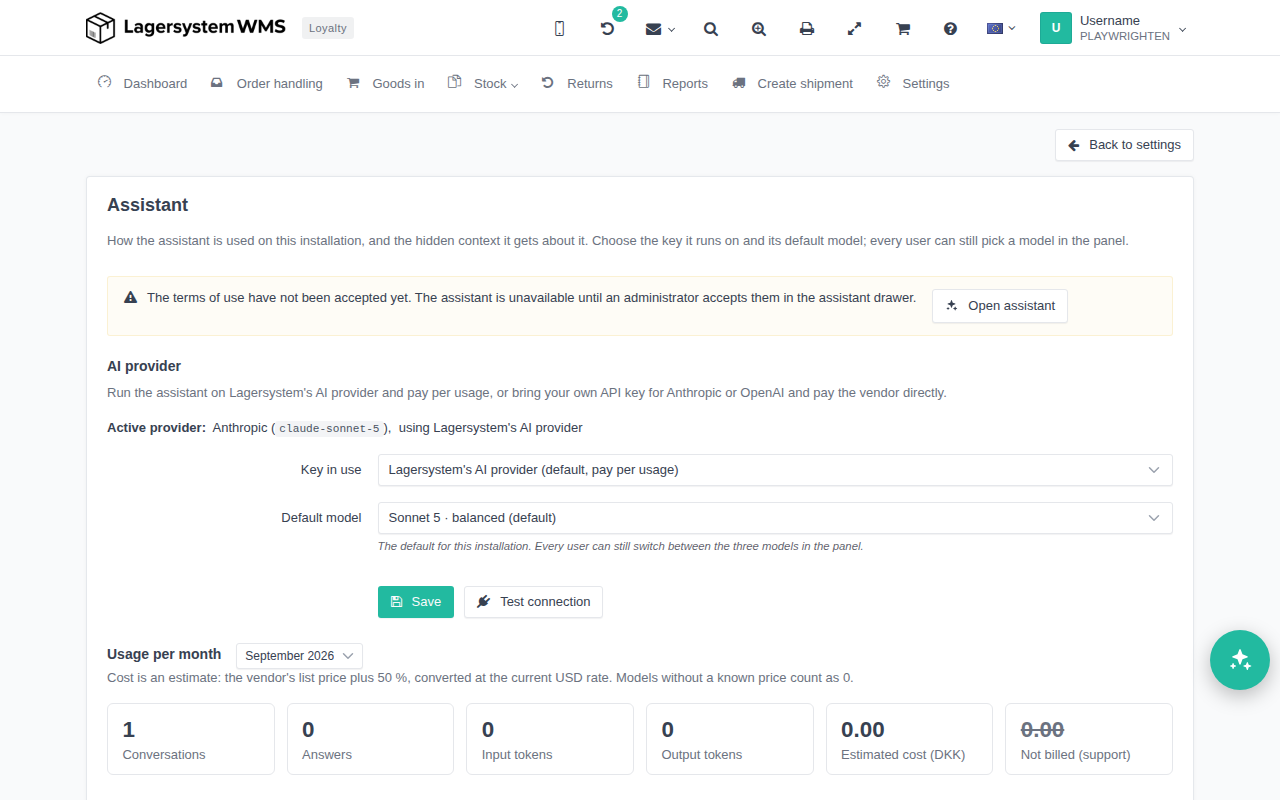
At the top of the setup page there is a status banner. This shows whether the terms have been accepted or declined, and who made that decision.
AI provider
This shows which AI model the assistant uses. By default, Lagersystem's provider is used, but it is possible to switch to your own access with Anthropic or OpenAI. If Lagersystem's provider is used, usage will be billed in addition to your subscription. You can always follow usage at the bottom of the setup page.
About this installation
The setup page includes the field About this installation (hidden context for the assistant). Here, an administrator can write the facts the assistant should always know about your installation — e.g. which integrations are in use, features you deliberately don't use, and internal house rules the assistant should follow.
The text in this field is sent invisibly (hidden) with every message to the assistant, so it isn't shown in the conversation itself, but it always forms part of the context the assistant answers from.